As a consulting company, we generally work with enterprise customers in the $500M to many billion-dollar range.  It’s not that we won’t work with smaller companies, this is just where the majority of our contacts lie given our collective backgrounds in enterprise software and consulting.  We operate mostly on the sell side of enterprise companies implementing eCommerce, master data management, configurators, pricing systems, CRM, and content management solutions and integrating them into our customer’s business processes.  We consistently see that better pricing practices stand out as the area where we can provide the most value to the companies we service.  Specifically, when we talk about Enterprise Pricing we are referring to large companies with complex pricing processes.  As described in a previous article, fixing pricing errors and providing the foundation for optimization yields an enormous benefit.

In our work, we span both B2B and B2C pricing. We approach the pricing process differently for these channels.  This is how we view the difference:

B2B.  Business to business commerce is usually done through relationships and typically requires a sales person to negotiate contracts or deals.  A target price or deal envelope can be used to drive sales people to the final price that is in line with a company’s goals.

B2C.  Business to consumer commerce might have floor sales people but typically no negotiation.  B2C pricing is usually done in a back office where a marketing or merchandising team determines the price.  The price is then sent down to stores and the eCommerce site.

Supply chain management commonly refers to the planning funnel which flows from strategy to planning and then execution.  Strategy is focused on activities for the next few years. Planning horizons deal with the next 6-12 months.  Execution focuses on immediate actions taken over the next few weeks.  I like to borrow this terminology when discussing pricing.  In this blog, we will focus on the medium and short-term processes of planning and execution:

Planning.  Planning, aka analysis and optimization, work in conjunction with each other to determine what the right price should be at a given location or for a particular channel.  In B2C, the systems typically employ a forecast that shows both base demand and promotional lift. Price elasticity can be used to analyze secondary impacts of price changes such as cannibalization and halo effects to determine what the right price should be.  B2B planning uses the same techniques, but also provides guidelines in the quoting process that direct the sales people towards the company goals.  These tools also measure performance against those goals.

Execution.  Execution takes the price from planning and gets the price to the place your customer will see it on an eCommerce site or to the POS.  Execution can include systematic checks to ensure that actions taken by the different business functions such as marketing and merchandising don’t conflict.  Also, store managers may need the authority to deal with unknowns such as local competitive actions. The optimized price coming from corporate may need to be overridden. In B2B, execution is really the quoting system.  This is where prices are negotiated, contracts are managed, and price commitments are sent to customers.

When we talk to customers about pricing, one of the initial things we establish is where they fall on the spectrum of pricing needs between B2B and B2C.  Companies that do both typically have different business units that handle marketing and pricing functions for the separate units.  Sometimes the lines can be blurred but in general we see these business functions at the intersection of these categories:

B2C B2B
Planning Lifecycle analysis and planning including promos, mark downs, and initial pricing.  In general, optimization is based on a forecast which drives a price-elasticity curve to determine the best price. Setting guidelines for sales people and targets that are in line with business goals.  Measuring sales people against those goals.  Setting tier discounts and negotiation parameters.
Execution Execution is rules based pricing and verification.  There may be different systems affecting price such as mark downs from merchandising and coupons from marketing.  Execution is where it comes together. Creating contracts, customer specific pricing, enforcing deal envelopes, creating quotes, approval processes, and spot quotes.

In B2C we’ve seen that the execution system is usually different than the planning system, but in B2B we’ve seen the planning and execution systems can be a single system.  I can only venture to guess why this is the case.  B2B systems typically have a lot of interactive users and workflow whereas B2C systems seem to focus more heavily on transaction speed.  I assume there’s enough of a market for these separate business problems that vendors have specialized in one or the other.

For analysis, the dividing line seems to be how much transaction data you have.  When you have enough data, then you can apply science to determine the optimal price and be statistically confident in the recommendations.  If you don’t have enough data, then you employ boundaries and reports to aid negotiation and rely on the sales person to ultimately make the decision.

The typical path we suggest to achieve pricing excellence is to first identify if you have a pricing problem and where you can improve on the process.  For many companies the starting point could be a price execution system to stem the price errors and put controls around how the price is calculated.  If this foundation is in place, you can progress to optimization.

In the next topics, we will cover the process we use to identify pricing problems and how big the opportunity is.  Then, we will discuss how you go about fixing the process.

One of our customers, a global clothing and accessory retailer, was looking for a more effective way to manage their prices.  Competitive threats precipitated the need to change prices frequently which stressed their existing process.  Their merchandising and pricing teams struggled with correcting price mistakes quickly and identifying where errors occurred.  Their process was caught in a cumbersome coordination between their host merchandising, spreadsheets, eCommerce, and Point of Sale systems.  The system we implemented made the process more effective, improved the speed at which they could respond to price mistakes, and gave them visibility to where the errors were happening.  Below is a review the benefits they received and how we helped them.

Business Case.  It is critical to have a well-defined business case that outlines the purpose of the project as well as a goal statement that addresses the business case.  In this case, the objectives were clear:

  • Ability to react quickly and flexibly to local market conditions
  • Correct mistakes faster through direct integration into downstream systems
  • Identify problems faster with better visibility into where the errors occurred
  • Consolidate pricing activities into a single system of record

Better flexibility in local markets.  As the competitive landscape changed, our customer needed the ability to change prices easily across local markets.  While price changes were possible in their previous process, a lot of manual effort was required.  Through the new tool and process we implemented, merchandisers were given the flexibility to change hard marks, sale, clearance, and promotional prices for any product and store combination.  This laid the foundation to rapidly change prices.  All prices are managed centrally and then individual files are generated for each store or the eCommerce site.  In the future, they may take advantage of real time APIs which would allow systems to immediately receive price updates without any delay.

Correct mistakes faster.  Correcting mistakes faster was a top priority in accordance with their business case.  Today’s retailers must have accurate pricing and be able to react quickly to errors.  The previous process would take about 2 to 2.5 hours to update mistakes or simply send out midday updates.  With the new solution the time was slashed to 20 minutes.  The previous process went through several steps with intermediary systems.  Now, they are able to generate the price change directly for the given stores and distribute the files immediately which are then transferred to the POS.

Gaining visibility to pricing outcomes.  Prices were buried in spreadsheets and often it was difficult to determine the actual effective price given overlapping hard marks, promotions, and stackable coupons.  In many organizations different people are responsible for merchandising and marketing and the ultimate margin is estimated until sales data is returned.  With the new tool, users are able to see how the prices were built, who created the promotion or coupon, and when it is effective.  The price administrators are able to search across the time horizon to see if a future price change will affect their expected margins.  Prior to the new process when a store recognized a price was wrong, they would notify the business who would then go through a flurry of emails to figure out where the error occurred.  Now, the pricing team is able to look up the item, find out exactly which promotions are applied, and correct the error quickly.

Consolidating pricing activities.  In the previous pricing process, activities were split between the host merchandising system, spreadsheets, and a separate system for multi-item deals.  Our customer wanted to consolidate those functions to have a single system for hard marks, clearance, sale, promotions, and deals.  They were able to do that through the new system which allows them to manage their prices and then distribute to their various channels.

Future considerations.  Looking into the future, our customer will be able to move price entry into the hands of the merchants rather than having a dedicated team for price entry.  This will allow the pricing team to focus on more strategic initiatives.  The next area of focus is store communications.  They manually create a document for store managers that tells them price changes and product placement.  With the addition of product placement information, the new solution will automatically generate this document.  This will streamline the process the merchandisers do to get information to the stores.  Finally, they are considering an Asia Pacific rollout and real time connections to systems to cut the response time further.

We were able to address the issues discussed above working with a cross functional team of merchants, eCommerce, IT staff, and pricing managers.  Working with these teams, we identified the critical issues with the process and implemented new capabilities that ultimately saved them time and money.

What is pricing excellence?  In our experience it’s a collection of processes, data science, and automation that ensures you have the right price at the right time for you customer.  Is the right price the best price for everyone?  No, it’s the price that balances your business goals against market conditions like when you want to maximize profit using price elasticity.  The right time means that your customers can get a relevant price in any channel they choose whether in a store, on-line, or through a partner eTailer.  Pricing excellence encompasses the ability to optimize your price and ensure that you can deliver those prices to your customers.

For me, my education about pricing excellence started many years ago in one of my first jobs at Trilogy in Austin, TX.  Trilogy was an energetic company with big ideas.  One of which was a ‘pricing engine’ that would dynamically price products, such as computers or automobiles, when a user selected options for the product.  It worked by providing a modeling environment where an administrator could construct the pricing calculations and conditions by which the product was priced without writing software code.

That certainly doesn’t sound particularly innovative today because it is common practice now, but back then many sales people would price in a spreadsheet or worse with a calculator and paper.  The new method did it automatically.  In working with different companies across industries, though, it highlighted that sales people and price administrators made mistakes when they manually calculated prices.  These pricing errors cost the companies money.  Interacting with these clients drove home how important it was to consistently give customers the right price and how important it was to institute a process to achieve pricing excellence.

I was describing pricing errors above, but when talking about pricing excellence many people automatically assume you mean optimization.  And, yes, optimization is a big part of pricing excellence, but the other component is reducing pricing errors and providing a foundation to be able to accept recommendations from an optimization process.  It’s like when I wanted solar panels and thought I could generate all the energy I needed.  Austin Energy would pay for a portion of it but they said they wouldn’t approve funding until I fixed the energy leaks in my house first.  I quickly found I was leaking more energy than I could ever generate, so set down the path of plugging those leaks.  It’s the old metaphor walk before you run and it holds true with pricing excellence as well.

After Trilogy, I continued down the pricing path at i2 (later acquired by JDA), wrote a pricing application myself and implemented it for metals companies, then worked as a consultant on a Lenovo eCommerce project.  Through it all, I saw that better pricing provided big benefits to customers.  Now, as a principle in DoubleBlaze, I know pricing is an area we can deliver significant value and set out to evangelize the message.  It is an area that many of our customers have yet to exploit.  Some are still using spreadsheets to manage prices and others have unreliable price execution.  Here are some examples of the opportunities that exist:

  • Pricing errors. A steel company I worked with found a 5% error rate in pricing on their invoices which translated to hundreds of thousands of dollars in lost profit.
  • Pricing efficiency. A leading retailer struggled to get prices out the door, often taking 4-8 hours and requiring hours of lost productivity to research the cause of the error.  Here is another example on how pricing efficiency affected a retailer.
  • Liquidating inventory. A customer of one of our technology partners found they could achieve their company goals of liquidating inventory while maximizing profit through better pricing  (will publish details later).
  • Increasing profit. Many years ago, a Harvard business review article Managing Price, Gaining Profit stated a 1% increase in price can yield an 11% gain in profit.  Of course there are a lot of dependencies such as your margin and demand but the point is – good pricing is important.
  • Driving revenue. AMR published a study that found promotions could drive a 1-12% improvement in revenue and a 5-20% improvement in margins.

These are just some examples of why pricing excellence is important.  Bottom line is that pricing errors leak profit and better pricing can improve profit.  Those two statements guide us when we work to deliver value to our customers.  In this blog, we will explore the techniques we use to determine if a company has a pricing problem, how to address the problems in a project, and finally how to lay the foundation for optimization.  I will draw from personal experience, our practice leaders experience, and partners to define the concepts and tease out the details.

When we engage with retail prospects for our services, the first thing I usually ask is, “Are you setting prices in a spreadsheet?”  If the answer is yes, likely you are experiencing challenges with your ERP or Host Merchandising system that were insurmountable and lead you to externalizing price setting through a spreadsheet.  Often it is not just a single spreadsheet, but many spreadsheets that must work in unison to deliver prices.

Spreadsheets aren’t the only cause of pricing problems.  In one case, we saw a retailer that has an optimization tool, but can’t reliably get prices down to stores.  This is a price execution problem rather than price setting.  Regardless of the reason, prices have to be set and sent to where customers can see them and problems can arise along the way that ultimately impact your profit.

If you suspect you might have pricing problems, how do you find out?  We typically start analyzing where errors are the most obvious.  At the highest level, commercial companies sell products for a price, customers buy the products, and you can check if the price for which you sold the product is the same as what you expected.  The specific points where errors occur differs by industry but for retail, you can typically start with:

  • Store operations. Store operations will typically be notified by sales associates when prices are wrong.  Track how many wrong prices are reported per week and which stores have errors.
  • Take a sample of orders and re-price them.  A random sample will give you an indicator of if there are pricing errors.

You can then quantify the financial impact of the price errors.  Products can be overpriced or underpriced and you can calculate the difference from the actual price.  If it is overpriced you risk losing a sale. You can also undermine customer satisfaction but that is tougher to quantify.  An underpriced product will impact profit and is easily calculated.  Secondly, when you identify pricing errors it takes time and effort to correct the price.  This has a cost in that an employee must analyze the error, correct it and move it through the systems to eCommerce or the POS.  For example, you can review the analysis from the metals company we worked with years ago.  Even though it has been 15 years, many companies still manually set prices in spreadsheets and experience similar error rates.

Once you realize how much price errors cost, you can figure out how to correct them by reviewing the process.  The metals producer mentioned above found they had a 5% error rate on all invoices.  This error rate is not uncommon when there are manual steps involved.  They analyzed the process from start to finish.  We used a similar approach and mapped it to fashion customers where we’ve seen a multi-step process that includes:

  1. Merchant sets initial regular price
  2. Merchant sets a calendar for promotions
  3. Merchant defines promotions and a pricing administrative team executes them
  4. Merchant sets mark down cadence for the season and pricing administrative team executes
  5. Prices are sent to store
  6. Store associate moves items and tags them

Where can this process go wrong?  It’s best to do a thorough review of the process.  What we’ve done in the past is to look at each step, interview the people doing the task and map out the steps and tools.  For fashion, here are typical areas of opportunity:

Merchant sets initial regular price.  When a product is introduced, the merchant sets the regular price.  They typically define price points to target and then assign specific styles to each price point.  A style is broken down into style-color-size combinations.  This explosion of permutations is where the process gets cumbersome.  For the most part, to make it easier, a style is generally priced the same but there are exceptions for size and color.  Then, if you’re dealing with multiple currencies the process expands for each of the countries you’re dealing with.  Price errors can occur when products aren’t mapped correctly or while converting prices for different countries.

Merchant sets calendar for promotions.  The promotion calendar is built for the season but initially specific promotions are only defined at a high level.  I’m calling out this step because merchants use it for planning but they’re not assigning the specific promotion yet.

Merchant sets promotion.  When the promotional event is closer, the merchant will set the promotions.  This can be specific discounts for a category, price points for a set of items, buy X get Y, or anything else a merchant can dream up.  Usually, a merchant will define these in as much detail they can within a spreadsheet.  Then, they hand it off to a pricing administrative team for execution.  The interpretation between what the merchant wants and what the administrator enters can be a source of errors.  For example, the merchant may inadvertently copy a style from a previous promotion or make an error while assigning a given item to a promotion.  The pricing administrator may be able to catch the errors, but some errors will slip through.

Merchant sets mark down cadence.  Depending on how a product is selling and how much inventory is left, merchants will set mark down cadence.  These are hard marks geared towards optimally selling through the inventory by the end of the season.  The use of separate systems for planning and executing these markdowns can lead to errors. Individual styles are marked down based on manual analysis or an optimization algorithm.  If there is no systematic hand off between setting the prices and executing on them, problems can occur.

Prices are sent to the store.  Once prices are set, they must be transmitted to the stores.  Given that each store has their own point of sale system and might have different prices, promotions, or markdowns, most stores get their own set of prices and rules.  For a large retailer, there can be 400 or more individual systems.  Each system is a potential failure point given that the POS must receive the prices, load them, and pull in the rules.

Store personnel moves items and tags them.  In parallel, promotional sheets are provided to the stores for product placement, promotional signage, and prices.  Any number of issues can occur here. Tight coordination is required at each store to insure the prices are correct on the tags and the products are in the right spot for the given promotion.

Reviewing this process can reveal areas of opportunity to plug the holes.  In this example, an up front system that allows the merchant to directly enter promotions or price changes directly would eliminate the opportunity for confusion with the price administrator.  A system to quickly and reliably transmit the calculated prices to the POS might be needed.  Alternatively, the POS could call out to a central pricing system which would eliminate the need to transmit the price data.  The promotional and placement sheets that store personnel use could be generated out of the price execution system rather than being created manually.  In some cases, electronic tags could be used.  Regardless, once we’ve identified the most egregious spots we tackle them first, then move to the next ones.  Typically, the solution relies on systems that can keep all the relationships in sync.  It usually includes better processes as well.  We look forward to learning about your specific processes and how we can help improve them.

In our consulting practice, we speak to many different retailers about their pricing needs.  Recently, the requests we have fielded are trending towards what I would term a centralized pricing service.  For many years across all industries the trend has been towards specialized services and we seem to have hit that point with pricing in retail.

In retail, we often see three systems that work in conjunction to deliver prices to customers: ERP (Host Merchandising), POS and eCommerce.  Prices come from downstream and are aggregated or augmented in the ERP system and are sent out to POS and eCommerce separately.  What retailers have found is that the ERP isn’t a very effective tool for managing prices, so they end up externalizing the pricing process in spreadsheets or custom systems.

This is because pricing sits in the void between eCommerce, POS, and ERP / Host Merchandising.  Many off the shelf and homegrown eCommerce solutions struggle to handle the volume of data associated with the permutations between channel and location.  POS is typically segmented for a single store and ERPs struggle to handle the transaction speed necessary for supporting real time or mass calculations in a timely manner.  This leaves enterprise retail pricing out in the cold with a hodgepodge of spreadsheets and custom solutions.

What is driving the need for a centralized pricing service?

  • Consistent pricing. Customers are demanding that retailers give them consistent prices on the internet and the store.
  • Amazon.  Grocery and fashion retailers watched as Amazon decimated other retailers and realize they have to make a change.
  • Hyper personalized offers. What used to work as location based offers don’t make sense with multiple channels, so retailers are starting to tie offers to specific customers to inspire loyalty.

Consistent pricing.  In many retailers, the eCommerce and POS are typically two disparate systems often with different functionality.  Maintaining consistency becomes an exercise in custom code or manual processes that break down.  Customers don’t really care what your internal issues are, they just want to be able to go online, see a price, then go into a store and get the same price.  And if they have a special deal because they’re a loyal customer, they want to get that same price in the store that they would receive online.  It’s not a new or unusual request and it’s been an issue in retail for years.  Customers are now getting frustrated and expect it.

Amazon.  Amazon has been dabbling in grocery and fashion for years now.  Then, they bought Whole Foods and are smack dab in the middle of grocery.  At the 2018 SXSW I was in a session where the CTO of Amazon Fashion stood up and questioned a leading fashion retailer.  They’re watching, learning, and getting better.  It’s inevitable that they will figure it out and retailers need to be prepared.  Of course, it’s not just Amazon, grocery and fashion have always had competitive threats.  It’s just more pronounced with Amazon encroaching.  Competitive and consistent pricing is one way to combat this threat.

Hyper personalized offers.  As competition closes in, another tool to entice customers to continue shopping with you is personalized offers.  In the past, retailers could offer location based or general coupons for customers.  Entrepreneurial affiliates on the internet have rendered general coupons a shared secret that serve to simply lower margins rather than inspire loyalty.  Retailers have since turned to coupons or offers that are tied to a particular customer.  On top of that, hyper personalized offers push existing systems to their breaking point.

These are just three of the most prominent complexities that are difficult to address with current solutions.  So, what would you need from centralized pricing service?

  • Fast. If you’re generating files for POS then it has to calculate potentially millions of price changes quickly and if you’re servicing internet requests, it needs to have fast response time.
  • Real time and batch interfaces. To serve different channel needs, the system needs to allow real time or batch interfaces.  In some cases, some retailers are seriously considering real time interfaces from the POS which would negate the need for batch.
  • Pricing system of record. A centralized pricing service needs to be the pricing system of record including day to day pricing, mark downs, promotions, coupons, contracts, and all the history.

Fast.  Whether you are enabling real time connections to your POS or generating files that will be distributed to your POS, a centralized pricing solution needs to be fast.  Retailers that have hundreds of stores with localized prices can easily scale to millions of calculations.  The system needs to be fast so you’re not waiting hours to get your prices out.  Without a pricing service, ERP typically shoulders that burden and given the number of calculations needed would take hours to process rendering the ERP unusable during that time.

Real time interfaces.  A centralized pricing service would be used for POS, eCommerce, and funneling prices back into your ERP or Host Merchandising system for financial calculations.  If your infrastructure can handle it, real time interfaces are the best way to go because then you have the right price from your pricing system of record.

Pricing system of record.  If you have a centralized pricing service, it needs to handle all pricing requirements.  This includes day to day pricing in grocery, regular price in fashion, hard marks, promotions and coupons.  Each of these are different events that change the price. They need to be tracked and historical records kept so that you can reconstruct the price at any point in time.  In addition, some retailers have b2b contracts with customers, so the system needs to handle customer pricing for individual products or groups of products.

In conclusion, if you’re finding pricing is spread across several different systems, you’re having to piece it together and you aren’t sure if your POS prices match your eCommerce prices it might be time to consider a centralized pricing service.  Leading retailers are trending in this direction and the flexibility a pricing service offers is tantamount to their success.

Pricing errors leak profits and they could be dramatically reduced with some effort.  Companies that have straightforward list prices are much easier to manage then when companies negotiate complex contracts.  Pricing errors are common place when companies negotiate regularly because there are so many exceptions to prices and conditions that sales people agree to which must first be put into a contract and second either executed by sales reps taking orders or automated into a system.  This exception process leads to a lot of errors.

Our customers cut across many different industries and these issues are prolific whether you are in metals, high tech, insurance, or other business to business situations.  One of our customers in the metals industry performed an extensive Six Sigma study prior to engaging us.  The study found their sales process and inter-communication caused thousands of problems a year.  The quantifiable errors cost them $1.4M a year and the upside was most likely $5M – $7M a year.

In Six Sigma, it is critical to have a well defined business case that outlines the purpose of the project as well as a goal statement that addresses the business case.  For the customer, the business case was obvious:

  • $750 million in sales, 60 thousand invoices, 3 thousand discrepancies.
  • No system in place to verify accuracy of contract and pricing for orders.
  • Loss of revenue, customer confidence, control of pricing in marketplace.

And the resulting goal statement was defined as:

  • Improve competitive pricing and invoice system for quarterly savings of $350K.

The customer’s first priority was reducing pricing errors in accordance with the business case and goal statement.  Today’s market requires more extensive information on invoices than in prior years including the price and how the final price is derived.  Their price components were base price, alloy surcharges, scrap surcharges, freight, freight equalization, and fuel surcharges.  Each one of these components were either contract values or tied to a monthly index average.  The steps for calculating and looking up values produced significant errors as shown in Table 1.

Total Invoices Price Errors Input Errors Retro Price Late Price Sheet Incorrect Price Sheet
Plant 1 561 225 5 21 93 217
Plant 2 39 31 2 0 0 6
Plant 3 489 220 2 31 103 133
Plant 4 411 248 8 4 45 106
Plant 5 221 29 27 4 6 155
Total 1721 753 44 60 247 617
% of Reasons 43.80% 2.60% 3.50% 14.40% 35.90%
% of Invoices 4.20% 1.80% 0.10% 0.10% 0.60% 1.50%
Avg cost/yr to correct $348,503.00 $152,483.00 $8,910.00 $12,150.00 $50,018.00 $124,943.00

Table 1

This table looks at invoice discrepancies only when payments received did not match the invoiced amount.  The number of invoice discrepancies were 4.2% of the total 60,000 invoices per year.  Errors were broken down into five categories including:

  • Price Errors, which were mis-calculations or incorrect lookups of price components.
  • Input Errors, which occured when transposing prices from spreadsheet calculations to the invoicing system.
  • Retro Errors, which were caught after the fact and changed.
  • Late Price Sheet, which occured when sales people failed to get price changes in on time before invoices were set out.
  • Incorrect Price Sheets, which were spreadsheets maintained by sales people that had errors or were interpreted incorrectly.

We worked with them to eliminate all of these errors by using a centralized pricing structure and automatically generating price sheets.  Sales people used the tool which had a similar interface as a spreadsheet which they were familiar with and prices were automatically stored in the central system.  So, when invoicing needed prices, they were always up to date and interpretation disappeared.

It was interesting to note in the study that more often than not, customers notified them when they thought they were over-billed, but customer reported under-billing was almost non-existent as shown in Table 2.

January February
Location Over Under Over Under
Plant 1 $39,867.13 $0.00 $6,965.65 -$232.35
Plant 2 $20,895.40 -$2,171.66 $5,842.22 $0.00
Plant 3 $29,933.82 $0.00 $3,282.29 $0.00
Plant 4 $13,555.53 $0.00 $8,392.71 $0.00
Plant 5 $1,700.74 $0.00 $87.73 $0.00
Monthly Total $108,124.28 -$2,171.66 $24,803.08 -$232.35
Running Total $108,124.28 -$2,171.66 $132,927.36 -$2,404.14
Annualized Rate $1,297,491.36 -$26,059.92 $797,564.16 -$14,424.84

Table 2

Statistically, the over and under billing errors should have been similar.  In the customer’s case, only one customer actually called back when he was under-billed.

As mentioned previously, with the new system the prices were correct the first time.  When we piloted the system, they checked 5 customer’s prices for a month period and found over $77,000 in under-billing that would have previously gone unnoticed.

The Six Sigma study also took an in depth look at why errors occurred.  The source of errors fell into the six bins shown in Illustration 2.  The main source of errors was the loose price sheet document, which they called a CPF.  This document was managed by sales people, but with little structure.  Sales is a creative process so sales people needed flexibility in managing customers, but the loose form significantly contributed to errors.

Market Environment CPF Document Pricing System Errors CPF Interpretation Time of Order vs Time of Shipping
1. No time for detailed price agreement with customer 1. No requirement for documenting agreement with customer 1. Same person not always available to price 1. Long learning curve for interpreting CPFs 1. Lack of need for documented agreement with customer for specific delivered price
2. Customer’s system is not compatable with CPF 2. No time for detailed price agreement 2. Input error prone 2. Complexity of CPF, agreement, non-standard info sources 2. No comparison of pricing to customer PO
3. Information not received in a timely fashion 3. CPF constructed several days after agreement 3. Illegible, handwritten info 3. Inconsistent interpretation of CPF and add-ons 3. Price is optional part of order entry
4. Amendments not received 4. Pricing using wrong sheet 4. Calculation errors 4. Same person not always available 4. Price at order entry not transferred to pricing
5. CPF not updated 5. Information not received in a timely fashion 5. Transposition errors 5. Didn’t capture info correctly from CPF 5. No checks on previous billing history
6. Information not available on time 6. Amendments not received 6. Employees time constrained 6. Missed charging for extras
7. No verification process with customer 7. CPF not updated 7. Documents hard to read 7. Misread the CPF
8. Format of CPF not compatible with pricing needs 8. Information not available on time 8. Working from the wrong sheet, line, or column
9. Information not available on time 9. No controls to ensure correct info is being used 9. No controls on using wrong infor from CPF
10. Price protected orders/shipments hard to ID
11. No controls on what ammendments are used for pricing
12. No controls on effective dates

We were able to address the majority of the error sources discussed above without interfering with the creativity of the sales people.  By centralizing pricing, standardizing calculation methods, and tables, we brought structure to the process but allowed sales people to customize price sheets according to individual needs.

Metals pricing is particularly complicated and if you’re going to tackle your own pricing errors, you don’t necessarily need to do a Six Sigma study before you start.  It certainly helps to unearth the estimated savings, but you probably already have a gut feel for where the leaks are coming from.  The first thing to do is get a handle on all the contracts floating around and the special conditions.  You can segment these, put them in spreadsheets and start from there.  Once you have the the special conditions isolated, you can put together a framework for exceptions that captures the majority of the conditions.  Then, you can offer those exceptions as the only exceptions you’ll allow from sales reps.  Giving reps some freedom within a process gives them some negotiating latitude that you can put into a system to cut down on errors.  It’s not simple, but it can be done and will help increase profit.

In a previous post, I discussed increasing profit through upgrades.  The next step is to wrap analysis around the process to further increase your profit.  Once you have the foundation of dynamic pricing you can gather data on selections the users opt for to help drive your gap prices.  With configurators, customers can build what they want and for analysis you need to capture what they start with, too.  This data should be stored on the order or somehow associated with the final configuration so you can do this analysis.

For example, let’s continue our example from before with System X.  The product manager wants to increase profit on upgrades and doesn’t know where to start.  He now has the order stream that includes the starting point configuration of either Good, Better, or Best and also has the actual configuration that was ordered.

Component Option
Starting Point Good
Product System X
Processor Gen1
Memory 8GB
Hard drive 1TB
Optical drive DVD


From here, the product manager can get a frequency distribution of the selected options by starting point.  In this case the product manager knows the hard drive has the lowest cost per upgrade and highest profit per upgrade, so she gets the frequency distribution of hard drives.  This is straightforward to do in a database as you can create a query that finds the frequency of a particular entry with respect to the base system.  You can also pull the data into an analytics product like SAS or you can code a perl/python script to do the work.

System X Distribution
Good Better Best total
Units 800 400 600 1800
% of series 133% 67% 100%
500 GB 70% 65% 60%
750 GB 10% 18% 10%
1TB 15% 12% 20%
100 GB SS 5% 5% 10%


Once she has the data, the product manager sees that roughly 65% of the time, the base hard drive is selected across all systems.  Interestingly, though, as you escalate up the chain, the attach rate for the higher end systems is greater for the higher capacity hard drives.

In this fictional scenario, the product manager would like to increase the attach rate for the 750GB hard drive which is accepted on average 15% of the time.  To do this, the she will need to experiment with prices of the 750GB hard drive.  She decides to do the experiment over a 3 week period with a different price point for each week as shown in the table below.

Hard Drive Price Cost Margin Week 1 Week 2 Week 3
500 GB  $100.00 $30.00 $70.00 $100.00 $100.00 $100.00
750 GB  $150.00 $40.00 $110.00 $145.00 $125.00 $135.00
1TB $200.00 $50.00 $150.00 $200.00 $200.00 $200.00
100 GB SS $200.00 $80.00 $120.00 $200.00 $200.00 $200.00


She figures that since there is only a $10 cost difference between the 500GB and 750GB hard drives, there is still a good margin improvement from additional sales on the 750GB hard drive.  She sets up a discount of $5 off the first week, $25 off the second week, and $15 off the third week.  After the price experiment, the product manager gathers the results to do some preliminary analysis.

System X Distribution
Week 1 – $145
Good Better Best
Units 200 100 150
% of series 44% 22% 33%
500 GB 68% 64% 56%
750 GB 12% 22% 14%
1TB 15% 12% 20%
100 GB SS 5% 5% 10%


In the first week with only a $5 discount, she sees an uptick of about 2% on the 750GB hard drive.  The second week increase is more significant with a $25 discount.

System X Distribution
Week 2 – $125
Good Better Best
Units 220 98 145
% of series 48% 21% 31%
500 GB 62% 60% 52%
750 GB 18% 23% 18%
1TB 15% 12% 20%
100 GB SS 5% 5% 10%


And the third week was in between with only a $15 discount.

System X Distribution
Week 3 – $135
Good Better Best
Units 215 110 153
% of series 45% 23% 32%
500 GB 65% 60% 55%
750 GB 15% 23% 15%
1TB 15% 12% 20%
100 GB SS 5% 5% 10%


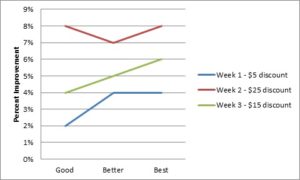
As expected, the drop in price bumped the uptake of the 750GB hard drive.  Below is a simple chart of percentage increase by week for each configuration.  When seeing this, she assumes that the Week 2 discount would yield the best results.

But without margin analysis, the chart would give her the wrong guidance.  She then calculates the aggregate margin normalized against the first week’s sales to show which price point performed the best with respect to margin.

Price point Total Margin
$150 $40,880.00
$145 $41,315.00
$135 $40,635.00
$125 $40,080.00


She now realizes that the simple $5 discount yields the most profit.  When performing the analysis, you’re not looking for a 100% optimal price, you’re looking for a good price that you can tweak to improve your profitability.  When we proposed this before, we suggested running an ongoing test where a percentage of the population was presented with varying discounts on the target hard drive.  Then, the product manager could receive weekly reports on the performance at different prices.

Of course this is fictional data, but it is based on our observations in the industry.  The analysis is straightforward and approachable for practically any product manager.  The reports are easy enough that IT can generate them where they can be opened in Excel to get started, then codified in something more permanent later.

In the beginning, there was Dell.  Dell was the pinnacle of what you strived for as an eCommerce site.  Dell had it all and we all copied them.  They had one of the most progressive eCommerce sites in the world and pushed concepts further like configuring, setting pricing based on future supply contracts, gigabuys for accessories, and an outlet store.  One of the things Dell pioneered was gap pricing.  It may sound intuitive now, but it wasn’t back then.  Early on, Dell figured out that if you showed the customer the actual price of the upgrade, they’d balk, but if you displayed it as an incremental price, they were more apt to buy.  In high tech, we dubbed this ‘gap pricing’ which means the practice of dynamically pricing upgrades based on the differential price between your current configuration and a configuration with the new selection.

The math behind gap pricing is straightforward, but cumbersome.  The foundation of gap pricing is the ability to dynamically price a configured system.  This is done by summing the prices of the components in the product.  For example, if you have a computer that includes the following components:

  • Processor
  • Memory
  • Hard drive
  • Optical drive

The first step is to provide a base price for the system.  Let’s call it System X.  Next, you would need to assign a price to each of the possible selections.  Taking it further, let’s say the component types had the following selections available:

Component Option Price
Processor Gen1 $50
Gen2 $75
Memory 8GB $100
16GB $150
Hard drive 500GB $100
1TB $200
Optical drive DVD $25
BlueRay $50


And System X has a base price of $500.

Now, you have the foundation for pricing the system.  Consider you start with a basic configuration of System X plus Gen1, 8GB memory, 500GB hard drive, and a DVD.  The price of the system would be $500 + $50 + $100 + $100 + $25 = $675.

Now, the gap price on the following components is:

Component Option Gap Price
Processor Gen2 $25
Memory 16GB $50
Hard drive 1TB $100
Optical drive BlueRay $25


This is what you would show the customer and they are much more likely to upgrade to a Gen2 processor if it is only $25 more rather than accepting the true cost of $75.

Once you have this foundation, you can start building other starting points for customers to buy.  For example, you could have System X plus Gen2, 8GB memory, 1TB hard drive, and a DVD.  This mid range system would cost $800 and finally you have the high end system with System X plus Gen2, 16GB memory, 1TB hard drive, and a BlueRay priced at $875.

With this, you would have your good, better, and best systems and it’s time to start merchandising them.  Say you are running a promotion and would like to discount the Basic system.  You do this by assigning a discount of $50 off on the Base price of System X.  So, the new price of System X is $500 – $50 = $450 and all the upgrade pricing is preserved.  But now the total price is displayed as ‘Starting at $625’.

Component Option Base Price Discount Price
System X Base Price $500 $50 $450
Processor Gen1 $50 $50
Memory 8GB $100 $100
Hard drive 500GB $100 $100
Optical drive DVD $25 $25
Total $625


Many sites price like this and show the list price as $675 and a savings of $50 for your price of $625.  The Your Savings is key because there is a sense of urgency to purchase since there is the possibility that the discount will go away at some point.  Additionally, customers will go through their own ‘What If’ analysis to determine the best product for the price by comparing different configured systems to each other.  Maybe there’s a $50 discount on the Best computer, but not on the Better computer and it convinces the customer to buy the Best computer which ultimately costs the customer an additional $25 and it’s a little more than they needed, but its only $25 more!

Why is this important?  Because upgrades are where the profit is!  The incremental cost of components like a hard drive is negligible, and if you can entice the customer to buy the larger hard drive your profit grows significantly.  For example, say the cost of the system is the following:

Component Option Price Cost Profit
System X Base Price $500 $450 $50
Processor Gen1 $50 $15 $35
Gen2 $75 $30 $45
Memory 8GB $100 $50 $50
16GB $150 $80 $70
Hard drive 500GB $100 $50 $50
1TB $200 $60 $140
Optical drive DVD $25 $15 $10
BlueRay $50 $40 $10


In this scenario, you can see that a processor upgrade provides a profit bump of $10, a memory upgrade is $20, hard drive is $90, and optical drive is $0.  The biggest bang for the buck is to have them upgrade the hard drive.  Given this, a discount on the hard drive of $50 would still yield a profit of $40.  You could do it as a system discount of $50 or a $50 discount on the individual hard drive.  In either scenario, you’re securing $40 more in profit.

One caveat, when you set the good, better, best configurations, you don’t want to allow the customer to downgrade from the initial configuration.  The reason is twofold, once you start offering discounts to the gap price, you could be losing profit on downgrades and if you have a certain profit target on the machine based on the cost of the components you could drive yourself into unprofitable territory if you allow customers to remove the parts that brought you the profit in the first place.

The ideas Dell pioneered in the early days of eCommerce are still with us today and gap pricing is one of the more powerful concepts that help companies increase their profit per order.  Even if you aren’t in high tech, these concepts can be applied to any customizable or semi customizable product offering whether its upgraded service offerings, packaging options, or add-on accessories.

In consulting, we have worked with many companies that have complex product offerings.  Between us we’ve seen high tech products like computers, servers, telecom switches, cars, construction equipment, health insurance plans, and phone service plans.  What all these products have in common is that customers have difficulty making buying decisions which means companies need to make the products simpler to sell.  I’ll discuss a few techniques for doing this below at a high level and then in future posts, I’ll delve deeper into each of the approaches.

A discussion about attributes.  To make it easier to buy, complex products need sorting, categorizing, and the ability to select features.  We do this through attributes.  All products have attributes whether it is a hard drive on a computer, insurance plan deductable, or a type of bucket on construction equipment.  All of these are attributes of the product.  In the recent past, attributes were buried in verbose descriptions of the products, which then required human experts to guide buyers through product features and help them in the buying process. But today we have computers that can help us do the laborious tasks of sorting and categorizing.  Attributes help us do this by associating products with similar attributes in categories.  As discussed in the value selling blog post, you can break a product down by sellable and descriptive attributes.  This might be a hard drive as explained before or calories in a candy bar for example.  Different products will have similar sets of attributes that are placed in categories.

How do you sell them?  Once your products are fully described, it’s time to organize them for sales.  This can be done with navigable categories for straightforward products, faceted browse for more complex products, and a configurator for very complex products.  You should mix and match these techniques to fit the particular buying style of the customer.  Some customers just want to pick from a list and others like to tinker with features.

Categories.  This is the simplest selling technique you can use.  All you’re doing here is placing similar products in categories that you create.  Many companies like to categorize products by their technical attributes.  For example, computers that use a similar processor, or trucks that have a similar towing capacity, or insurance plans that have a certain deductible.  You can segment your products by these attributes and put them in categories that make sense to sell them.  When you have a limited number of products and they don’t change frequently, this is a fairly easy way to help customers sort through your products.

Faceted browsing.  As your products scale the ladder of complexity, faceted browse is the next helpful technique for selling your products.  Think of these as dynamic categories.  Rather than placing your products in categories yourself, you have your list of products described by attributes. You then establish some high level search parameters so a customer can search via the attributes to create their own categories based on what is important to them.  For example, suppose you sold computers and one of your faceted browse categories was processor.  You would have the list of processors and the customer could select them.  Faceted browse would respond by displaying all the computers with that corresponding processor.  You can get more interesting with faceted browse where you have ranges of values such as price ranges or product dimensions as long as the underlying attributes support it.

Configurator.  For the most complex products, a configurator is necessary.  Configurators allow you to specify rules between attributes for things like compatibility matrices or simply Boolean rules that dictate how attributes interact.  High tech makes heavy use of configurators allowing customers to select between processors, hard drives, optical drives, and other features ensuring the final list of selections is compatible.  Evan Amazon is delving into basic configuration with things like shirt sizes or different book formats. For Amazon, they have a list of SKUs and associated attributes.  The list of products is reduced when you make selections.  This is similar to faceted browse as it is list reduction, but presented in a different interface other than faceted browse.  More complicated products utilize rules that dictate compatibility and will display options, then reduce the options for future selections based on those rules.

What is the best technique for you?  It really depends on your product portfolio and your audience.  To those of us in the industry these concepts are second nature, but it always amazes me to see sites with complex product offerings who haven’t thought through how their customer wants to buy.  One company that comes to mind has a catalog of their products, some simple, some complex that is completely separate from their configurator.  When a customer sees a product they’d like to buy, they have to remember the features and apply them in the configurator themselves.  The customer buying experience only serves to frustrate potential customers and drive them away.

Limit facet categories.  If you don’t have products to cover all your facets, then limit your categories or opt for straight categories.  It’s a bad idea to provide a facet searching capability and then present the customer empty search results.  Make sure that your facets are driven by what you have in your catalog.  And if a certain facet category is unavailable based on previous facet selections, make sure you grey it out or remove it altogether.  If your system doesn’t prune your facets automatically based on your catalog items, you’ll have to spend time pruning facet categories yourself.

Combine your catalog and configurator.  Starting point configurations make it easier for a customer to use a configurator.  These are pre-selected configurations that customers start with when they configure a system.  The starting point configurations can be placed in catalogs or searched through faceted browse, but then configured when a customer selects them.  It just makes it easier for a customer to start with a pre-configured system rather than building everything from scratch.  It also helps with customer satisfaction because the pre-configured system is already valid and can be purchased without any changes.  As with the example explained above, the company mentioned neglected this altogether giving the customer free reign on building anything they wanted.  If you have a broad range of uses for your product, it is best to define industry specialty starting points that the customer can buy or extend.

Good, better, best.  Starting point configurations can be built in many ways.  A good way to build them is to create good, better, and best options.  Some customers automatically navigate to the value systems and some customers like to start with the high end systems.  By creating different options for starting points, you can satisfy a range of customers and help them get to their preferred configuration quicker.  When you arrange them on the screen, psychologically customers in western countries navigate to the item on the left as the ‘value’ option and the one on the right as the ‘power user’ option.

Help me decide.  Still another way of helping the customer is to provide a help me decide feature that guides the customer to their optimal products based on their preferences.  When done correctly, this can benefit the customer, but when done incorrectly it just looks like a sales technique pushing certain products.  The key with this is defining the attributes on the products that correspond to the lifestyle choices.  Too many times, companies are unwilling to extend a products attributes and try to fit the attributes they have into the lifestyle categories and it doesn’t work very well.

Natural language search.  Still another technique that is used in conjunction with faceted browse is the natural language search.  With the natural language search, customers enter words into a search field and search across all products.  The results are simply a list which can then be further refined by faceted browse.  This is a good way for a customer to find the products they want quickly.  The natural language search box should be prominently displayed on the landing page so the customer can enter the text and see results immediately.

These are just a few ways you can tweak your product selling techniques.  As mentioned before, this is simply a high level description of the tools.  In future posts, I will explore details of how we’ve approached designing and using these tools in different customer contexts.

One of our customers initiated a new program to sell through eTailers.  As mentioned in another blog article, you have to get the product data to the eTailer, receive orders, and then foster growth.  In this article, we’ll talk about how we got product, price, and inventory information to this customer’s channel partners.

When tasked with this problem, we first went through an evaluation process, and then a vendor selection process.  Ultimately, the vendor we settled on was Akeneo.  The Akeneo platform was born out of the founder’s experience with Magento. They saw that there was complexity managing the data that went into the eCommerce system.  So, they created Akeneo to address the challenges. We’re up and running now and we are building a sustainable model for servicing the channels.  This starts with automating the process for getting product, price and inventory data to the eTailers.

Overall, Akeneo is a solid product.  It’s open source so you have access to the code to make changes and it’s pretty easy to modify.  For this customer, the high level process was straightforward:  Import products, prices, and inventory positions into system; update data; and then export in format for channel partner.

It was a little different than Akeneo’s original intention which assumed you were getting the same product data out to the omni-channels you serviced such as web, print, mobile, etc.  Our use case was different in that we were getting product data out to lots of different eTailers.  The products weren’t always the same, the descriptions weren’t always the same but could be, and the prices and inventory weren’t always the same.  So, we had to make some modifications.

The baseline Akeneo workflow provided a solid foundation of features we could build on to support the operations.  The basic premise is the same – data is imported, data is modified, and data is exported.  In the Akeneo interface, these steps are defined as Collect, Enrich, and Spread.

Collect.  The first step is to import the data.  In this case, we had a few different sources of data – all flat files – which were delivered to a secure FTP server every morning.  From there, we had different profiles of import scripts in Akeneo.  These imports are scheduled daily using the internal Akeneo cron utility.  There is some custom processing we had to do on import such as concatenating several fields together, but it was simple enough to do in PHP.  We also had to modify the import scripts to preserve manually overwritten data which we will talk about more in the Enrich step.  We added a pull from an external secure FTP site to move the files to the local server and we added a number of error conditions that are reported during import.  The scripts run daily and there is a lot of data that changes, so these additions were critical to making the process work in production.

Enrich.  Once the data is imported, we enrich it.  Akeneo’s base functionality has most of features we needed in that you can view and change product details, you can see historical changes, you can create product classes (which they call families) to determine what attributes are required, and you can categorize the products in one or more catalogs.  All necessary things for managing product data.

For us, the imported data can change frequently and we had to have a process to preserve manually overwritten data, otherwise we would have had to re-enter the manual data after every refresh.  We also wanted to utilize Akeneo’s internal history function to show when an attribute had a manual override so that a manager could go back and research who had made changes.  We accomplished this by adding additional ‘preserve’ attributes that mirrored the standard attributes and then added custom code that modified the history.

The next change we made was to modify the Available functionality.  We added a toggle on the data grid to add or remove the part from the channel and the ability to mass update the parts to toggle the Available field.  We use the attribute to indicate if the product is available in the channel and only export those parts during the export.

Next, Akeneo has global attributes and channel based attributes.  For us, we don’t always use the same data across channels, but can.  So, in the edit screens we added an ‘Apply to all channels’ button for the attributes that could.  You can modify the value, then if you want it to apply across all channels, you click the button and it copies the data.

Another feature was to only export a partial list of parts in an export profile.  Some of the channels only want net change for product descriptions, but then a full export of pricing and inventory.  So, we modified the data grid to allow us to send a partial list of exports to a selected export profile.

Finally, we added price and inventory reports that would show us prices and inventory across all channels.  We needed a single place to go to view prices and inventory across multiple channels and Akeneo does not provide that functionality in the base install.

These were all straightforward changes that we implemented in the PHP code which were done in weeks not months.

Spread.  Once the data is finalized, it has to get to several different channel partners including eTailers like eBay, Sears, and Amazon.  Each of these eTailers has their own data requirements and delivery nuances.  For example, eBay requires the data in a zipped, tab delimited file format.  They require a file for product information and a separate one for price and inventory updates.  For automated updates, Sears requires the data in an XML format and sent via an HTTP API.  To complicate things further, some vendors require minimum or maximum characters on different fields.  All of this is handled by the export process.

Akeneo has export profiles which we use for all the different file formats.  Each channel partners has one or more export formats that mirror the files they require.  For example, eBay has two export profiles – one for product data and a separate one for price and inventory data.  We took the process a step further and added ‘delivery’ functionality.  Once the data is exported, it is then packaged for delivery to the respective channel.  In the case of eBay, the files are zipped and then ftped to the eBay servers which are automatically imported at a specified time interval.

Summary.  All in all, Akeneo provided a solid base from which we expanded the functionality for our specific needs.  The tried and true technology stack of PHP and MySQL, while might not be the most exciting technology, is very mature and easy to change.  We made the mistake of chasing new technologies initially and it bit us in the wallet.  It was much more expensive than it needed to be, was difficult to modify, and difficult to find people that knew the technology stack.  Akeneo was much quicker –from start to finish took 3 months – and we’re on to the next step of helping them increase sales in these channels.